What is Indexing in SEO?
- Home
- Knowledge Sharing
- What is Indexing in SEO?
One of the most crucial aspects of SEO is indexing. SEO indexing It's the process through which search engines like Google discover, analyze, and store web pages in their databases. Understanding indexing is not just important, it's empowering. It's the key to ensuring your content is accurately represented and accessible in search results. Even the most well-crafted content may remain invisible to potential visitors without proper indexing, hindering your SEO efforts and overall online presence.
Definition of Indexing
In Search Engine Optimization (SEO), indexing refers to how search engines organize and store information about web pages. When a search engine's crawlers discover a webpage, they analyze its content and add it to its index—a vast database of all the web pages the search engine has identified. This indexed content is what search engines refer to when generating search results for user queries.
To better understand indexing, consider a book's index. Just as a book index lists the topics covered in the book and the pages where they can be found, a search engine's index catalogues web pages and their content, making it easier for users to find relevant information quickly. Proper indexing ensures your website is visible and accessible in search results, which is crucial in effective SEO strategies. Understanding what indexing in search engine optimization involves is essential for improving your website's visibility and ranking in search results.
Importance of Indexing in SEO
- Visibility in Search Results: Indexing ensures that your web pages appear in search engine results, making it possible for users to find your content.
- Organic Traffic: Properly indexed pages attract more organic traffic, as they are more likely to appear for relevant queries.
- SEO Performance: Without indexing, even the best-optimized content may remain unseen, limiting the effectiveness of your SEO efforts.
- Competitive Advantage: Indexed content can outrank competitors, giving your website a higher position in search results and driving more traffic.
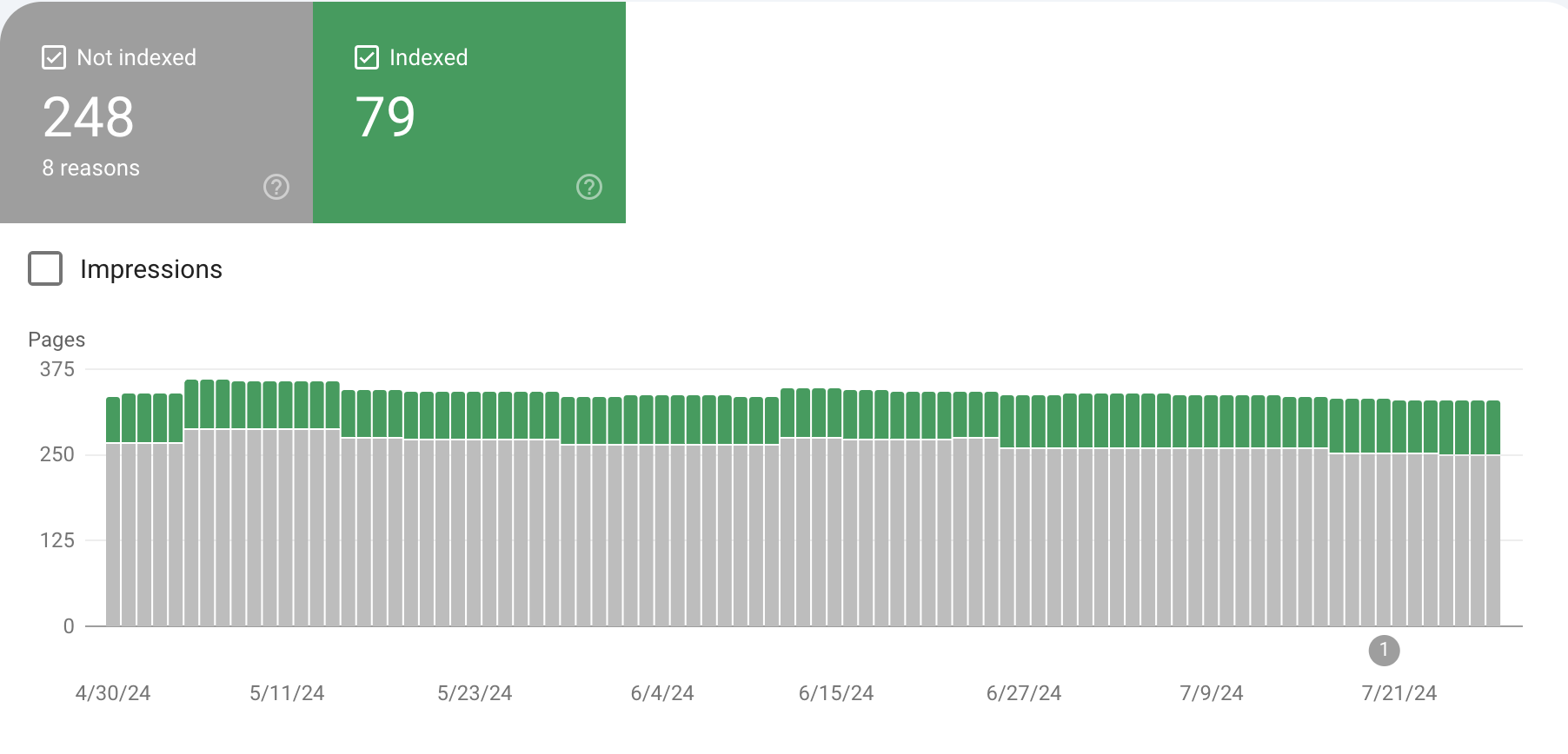
If most pages on your site are not indexed, they will remain invisible to search engines and users. This can severely limit your website's reach, significantly reducing organic traffic and a weaker online presence. Unindexed pages mean missed opportunities for attracting potential customers and growing your business.
https://share.cleanshot.com/8yjdmMFF
How Search Engines Index Content
Search engines like Google rely on sophisticated methods to discover and organize the vast amount of information available on the web. This process begins with web crawlers, bots, or spiders, which systematically browse the internet to find new and updated content. These bots follow links from one page to another, gathering data about each page they visit.
Once a web crawler discovers a page, it analyzes the content, including text, images, and metadata, to understand what the page is about. This information is then added to the search engine's index, a massive database that stores details about all the web pages the crawler has found. This indexed data quickly retrieves relevant results when users search, ensuring that the most pertinent pages appear in response to their queries. Search engines can provide accurate and timely information to users worldwide through this intricate process.
Common SEO Indexing Problems and Solutions
|
Error |
Description |
Solution |
|
Duplicate Content |
Content appearing in multiple locations (URL) causes search engines to rank it lower or ignore it. |
Use canonical tags, consolidate duplicate pages, and ensure unique content on each page. |
|
Robots.txt Restrictions |
The misconfigured robots.txt file can block search engines from crawling and indexing important pages. |
Review and update robots.txt file to allow indexing of critical pages. |
|
Noindex Tags |
Noindex meta tags can instruct search engines not to index certain pages, sometimes used inadvertently. |
Remove unnecessary noindex tags from important pages to ensure they are indexed. |
|
Dynamic Content |
Content that changes based on user interaction or other factors may not be indexed properly. |
Use server-side rendering (SSR) or pre-rendering to make dynamic content accessible to crawlers. |
|
Poor Site Structure |
A simple or clear site architecture can make it difficult for crawlers to navigate and index all pages. |
Simplify and organize site structure with a clear hierarchy and internal linking. |
|
Broken Links |
Links that lead to non-existent pages (404 errors) can prevent crawlers from accessing and indexing content. |
Regularly check and fix broken links to ensure all pages are accessible. |
|
Lack of Backlinks |
Pages with few or no inbound links are less likely to be discovered and indexed by search engines. |
Build quality backlinks to important pages to improve their discoverability. |
|
Slow Page Load Speed |
Pages that load slowly may not be fully crawled, impacting their chances of being indexed. |
Optimize page speed by compressing images, leveraging browser caching, and improving server response times. |
Ensuring that your pages are free from these common issues is crucial for improving your website's visibility and performance in search engine results. Regular
audits and optimizations can help ensure that all valuable content is indexed correctly.
Factors Influencing Indexing
Search engine indexing algorithms determine which web pages appear in search results and how they are ranked.
- Quality of Content: High-quality, relevant, and valuable content ensures that search engines recognize and prioritize your pages.
- Use of Meta Tags: Properly optimized meta tags, including title tags and meta descriptions, help search engines understand the content and purpose of each page, aiding in accurate indexing.
- URL Structure and Site Architecture: A clear and logical URL structure, combined with a well-organized site architecture, facilitates more straightforward navigation for search engine crawlers, improving the indexing process.
- Internal Linking: Effective internal linking helps search engines discover and access all pages on your site, spreading link equity and enhancing overall site indexing.
- XML Sitemaps: XML sitemaps provide search engines with a roadmap of all your site's pages, ensuring that new and updated content is discovered and indexed promptly.
- Robots.txt File: The robots.txt file instructs search engine crawlers on which pages to crawl and which to avoid, directly impacting the visibility and indexing of your content.
By optimizing these factors, you can significantly improve the likelihood that search engines will properly index and rank your website's pages.
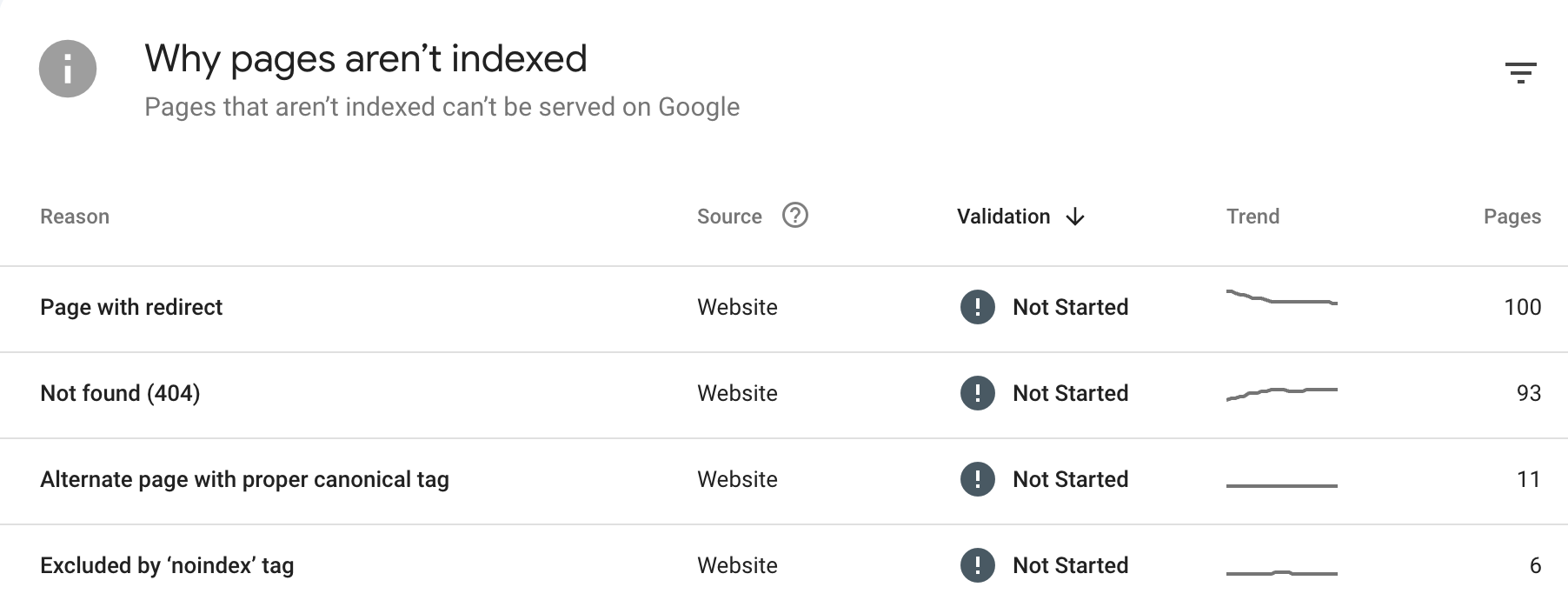
https://share.cleanshot.com/h75g9Ys1
Tools for Checking Indexing Status
Monitoring the indexing status of your website is essential for ensuring that your pages are correctly indexed and visible in search engine results. Several tools can help you track and manage this aspect of SEO:
- Google Search Console is a free tool provided by Google that allows you to monitor and maintain your site's presence in Google search results. It provides detailed reports on indexing status, crawl errors, and other critical SEO metrics.
- Bing Webmaster Tools: Similar to Google Search Console, Bing Webmaster Tools offers insights into how your site is performing in Bing search results. It includes features for checking indexing status, identifying crawl issues, and optimizing your site for better search performance.
- Third-Party SEO Tools: Tools like Ahrefs, SEMrush, and others offer comprehensive SEO analysis, including indexing status. These tools provide in-depth data on how well your site is indexed and recommendations for improvement.
Using these tools, you can effectively monitor your site's indexing status, identify and resolve issues, and optimize your site for better search engine visibility.
Optimize Your Indexing with Seologist's Expertise
Indexing is a fundamental aspect of SEO, ensuring your website's content is discoverable and ranks well in search engine results. Proper indexing helps drive organic traffic, improves user experience, and enhances overall SEO performance. Regularly monitoring and optimizing your indexing status is essential to maintain visibility and stay ahead of the competition.
To achieve the best results, consider partnering with Seologist. Our team of experts can help you ensure your site is fully optimized and indexed correctly. Contact Seologist today to take your SEO efforts to the next level and maximize your online presence.
Indexing in SEO FAQs
How can I tell if my website has an indexing problem or a ranking problem?
Start by checking whether key URLs appear with a site:yourdomain.com search in Google, and then confirm their status in Google Search Console’s Page indexing report. If a page is reported as not indexed or excluded, you have an indexing issue rather than a ranking one. When a URL is indexed but receives very few impressions, that is usually a relevance or competition problem instead. Using Search Console’s URL Inspection tool helps you see exactly how Google handled a specific page, including crawl and index details.
How does crawl budget affect indexing on large or frequently updated sites?
Crawl budget is the amount of crawling attention a search engine is willing and able to give your site within a period of time. On very large or rapidly changing sites, inefficient use of this budget can mean important pages are discovered late or revisited too rarely. If Googlebot spends time on endless filter URLs, parameter pages, or low value content, high priority URLs may not be crawled as often as needed. Google provides guidance for large site owners on managing crawl budget so important content is easier to index.
What can I do before publishing a new section to help it get indexed faster?
You can prepare by ensuring the new section is linked from existing, frequently crawled pages such as your home page or key hubs. Adding the new URLs to an XML sitemap and submitting it through Google Search Console helps search engines discover them more quickly. Avoid launching with placeholder or very thin content, since early crawls influence how the section is evaluated. After publication, use the URL Inspection tool to request indexing for a few representative pages and monitor how quickly they appear.
How does heavy use of JavaScript affect indexing and what can I do about it?
JavaScript based sites sometimes require an extra rendering step before search engines can see the main content, which can slow or complicate indexing. If important text and links only appear after client side scripts run, crawlers may not always process them efficiently. Options like server side rendering, dynamic rendering, or using frameworks that output crawlable HTML can reduce this risk. Google’s documentation includes specific guidance for making JavaScript content easier to crawl and index.
What is index bloat and why can it hurt my SEO performance?
Index bloat happens when a search engine stores many low value or near duplicate URLs from your site, such as endless parameters, thin tag pages, or outdated content. This can dilute signals, make diagnostics harder, and waste crawl budget on pages that do not help users. Over time, search engines may struggle to identify which URLs truly represent your best work. Cleaning up unnecessary URLs with redirects, consolidation, or noindex instructions helps keep the index focused on the pages that matter most.
How should international or multilingual sites approach indexing strategy?
For multilingual or multi regional sites, it is important that each language version has its own crawlable URL structure rather than relying only on automatic redirection. Implementing hreflang annotations helps search engines understand which version to show users in different locations, but they still need to crawl and index each variant first. Clear navigation between languages and regions ensures bots can discover all versions without depending on cookies or scripts. A well structured international setup reduces conflicts in the index and improves visibility for each market.
How often should I review my index coverage and what should I focus on?
For most active sites, a monthly check of the Page indexing report in Google Search Console is enough to spot patterns early. Look for sudden changes in the number of indexed pages, new error types, or a rise in excluded URLs that should be eligible for search. Prioritize issues that affect large groups of important URLs, such as configuration mistakes or unexpected redirects. This regular review turns indexing into an ongoing process rather than a one time technical task.
How do site migrations and large redirect changes influence indexing?
When you move content to new URLs, search engines need time to recrawl the old addresses, see the redirects, and update the index. If redirect rules are incomplete, inconsistent, or temporary where they should be permanent, some pages may effectively disappear from search for a while. Planning migrations with clean redirect maps, updated sitemaps, and stable internal links helps crawlers understand the new structure quickly. Google’s documentation on redirects and site moves offers detailed guidance on minimizing indexing disruption.
Can log file analysis help me improve indexing and how?
Server logs show which URLs search engine bots actually request, how often they visit, and which status codes they receive. By reviewing this data, you can detect problems such as bots spending time on unimportant URLs, encountering many errors, or rarely visiting key pages. Patterns in logs often reveal crawl inefficiencies that are not obvious from surface level reports. Combining log insights with Search Console data gives you a much clearer picture of how indexing really works on your site.
How long should I wait before worrying that a new page is not indexed and what can I do if it is slow?
Indexing timelines vary, but for typical sites new pages are often discovered within a few days if they are linked from existing content and listed in sitemaps. If a page remains unindexed after a couple of weeks, check for technical issues such as incorrect meta tags, blocked resources, or lack of internal links. You can then use the URL Inspection tool to request indexing and see whether Google reports any problems. Persistent delays may indicate broader crawl budget or quality concerns that require a deeper audit.