How to Optimize for “People Also Ask”
- Home
- Knowledge Sharing
- How to Optimize for “People Also Ask”
What are People Also Ask Boxes?
Before we discuss PAA's impact on SEO, it's worth defining what this section entails.
With Google's People Also Ask (PAA) feature, users can find answers to questions related to their original keywords. Typically, these questions appear as drop-down menus that can be expanded to show additional questions and answers.
How Do You Feature in People Also Ask?
Search engines like Google aim to provide users with the most accurate and helpful answers to their queries. Therefore, websites that offer clear, concise, and useful responses to frequently asked questions in their niche often appear at the top of Google's search engine results.
Often, this looks like:
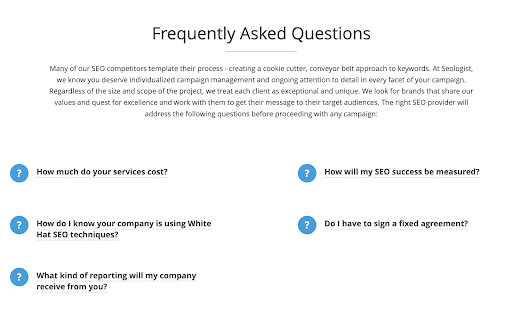
These questions may also relate to your brand overall, or cover a particular topic. You can also create a separate knowledge base page, or incorporate brief FAQ sections into existing pages, such as the homepage or product pages.
An optimized FAQ section has significant potential to increase traffic to your website through search engines. It's also a great way to foster user engagement and boost conversion rates on your site.
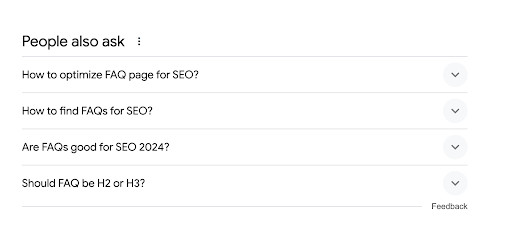
Here's an example of how Google presents results when you input a question - results for "Optimizing FAQs for SEO" appear as:
However, this is only beneficial when optimized for relevant keywords and well-designed from a UX perspective. Simply dumping a bunch of questions exported from a keyword tool and providing quick answers on a page is not the best approach for achieving your Toronto SEO goals.
Importance of FAQs in SEO Strategy
When you write an FAQ section to address your customers' questions, you present high-quality and up-to-date content. This is positively evaluated in SERPs, and can improve your site's ranking.
Several key benefits of FAQs include:
- Enhancing user interaction and meeting your customers' needs.
- Increasing the level of quality and relevant traffic.
- Improving website visit duration and conversion rates.
- Reducing the workload of your customer support team
A well-crafted FAQ page can assist potential customers in obtaining all the necessary information about your brand and products before making a purchase. It can educate, inform, and naturally guide users through your website's content towards achieving your objectives and desired outcomes.
Additionally, it offers some extra benefits for SEO.
Where Do You Find Questions to Answer?
Researching niche questions is the most powerful source of content inspiration. Analyze what people struggle to understand when it comes to your industry, and how you can best assist them.
These questions can be categorized into:
- General Questions : These encompass standard terms you can use to describe your services and their meanings.
- Practical Questions : These instructions help users navigate your site better and accomplish specific goals more quickly.
- Brand-Focused Questions : Here, you can prepare questions related to your brand. This can include details about your operations, the cost of services or products, etc.
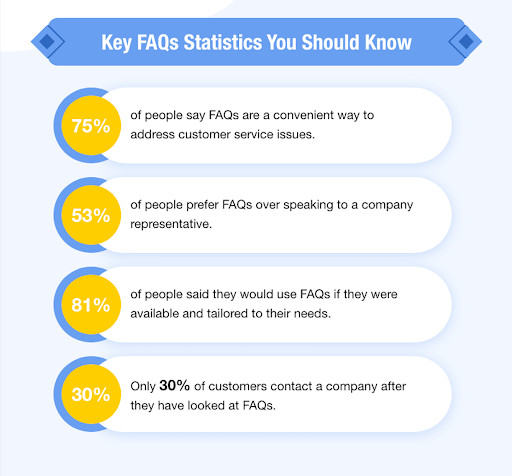
In most cases, you don't need to write lengthy explanations, as people seeking them look for quick, easy-to-understand answers.
Keyword Optimization Strategies
Selecting the right keywords for your FAQ section is crucial for achieving favourable SEO outcomes.
Begin by conducting thorough keyword research to identify the terms and phrases your target audience is using to search for information related to your niche.
- Utilize keyword research tools, such as Google Keyword Planner, SEMrush, or Ahrefs, to explore relevant keywords, assess their search volume, and evaluate their competitiveness.
- Look for long-tail keywords and specific questions that align with your content and address common queries users may have. Additionally, consider analyzing competitor FAQs to identify gaps or opportunities for differentiation.
- Aim for a mix of high-volume keywords to attract broader traffic and more targeted, low-competition keywords to capture niche audiences.
- Once you've compiled a list of potential keywords, prioritize those that have a good balance of search volume, relevance to your content, and achievable ranking potential.
Review and update your keyword strategy regularly based on changes in search trends and user behaviour in order to ensure your FAQ remains optimized for SEO success.
Implementing Schema Markup
Implementing schema markup for your FAQ page can enhance your website's visibility and increase its authority.
What exactly is Schema Markup? A Schema Markup is a specialized markup that you can add to the code of a webpage containing a list of questions and answers. Google then reads this markup, and uses it to create an enhanced snippet.
This can increase the chances of your content appearing in the search results under the "People also ask" section.
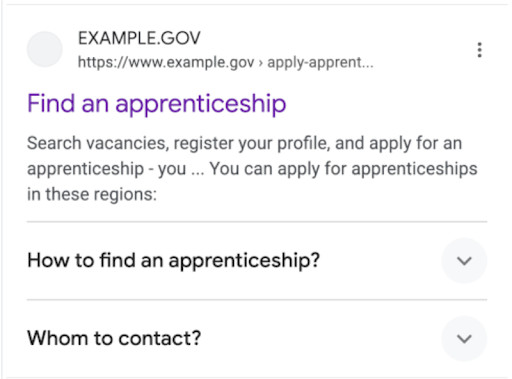
You can place FAQ schema markup on your website in two locations, depending on how you've implemented them on your site:
- FAQ pages
- Pages with a FAQ section
There are two ways to implement a schema: microdata, or JSON-LD. You can choose either method, but it's important to stick to one option, and not mix them to avoid errors and ensure the correct display of the schema.
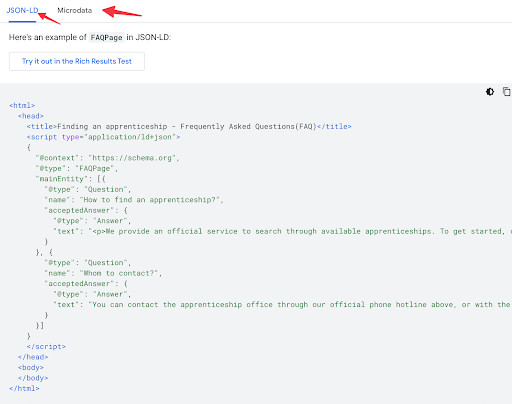
After you've added the markup to your site, we strongly recommend verifying it.
You can test your schema using Google's Rich Results Test . It will scan the added schema and display results, showing whether or not everything is displayed correctly, or if there are any errors.
Let's sum it up
- Explore your niche and research frequently asked questions. Dive into your experience and find recurring questions you always answer.
- Create your FAQ by jotting down questions and answers. Be concise, precise, and, most importantly, helpful. Remember, Google loves good helpers.
- Place these frequently asked questions on your website. Ensure it's visually appealing and easy to navigate.
- Utilize structured Schema data to make it easier for search engines to understand your frequently asked questions.
- Use a schema validation tool to check your work, then submit the new or updated page to Google's Search Console.
FAQs are a powerful but often overlooked content opportunity. Studying and optimizing your audience's common questions can increase organic visibility and enhance user engagement. Want more exposure & leads/sales through SEO? Contact our experts and we will set up a free consultation.
Optimize for People Also Ask FAQs
How can you tell if your People Also Ask optimization is actually working?
To measure impact, track impressions and clicks for queries that include question-style keywords in Google Search Console, then compare performance before and after you add or improve FAQ sections. Combine this with on-page metrics like time on page and scroll depth to see whether visitors who land via PAA stay and explore. If those users view multiple pages or convert more often, your answers are aligned with their intent. Featured snippets and related questions often pull from the same pool of “best” answers, so watch for growth in both areas over time.
How long should an FAQ answer be to qualify for People Also Ask results?
Most PAA-style answers work best when they give a direct, self-contained response in two or three short sentences. Aim for a clear definition or takeaway in the first sentence, then add one or two sentences of supporting detail. This style makes it easy for Google to extract a clean paragraph while still giving users a reason to click for more context. Overly long, meandering answers are less likely to be chosen as quick responses.
What is the difference between optimizing for FAQ rich results and People Also Ask?
FAQ rich results rely on FAQPage structured data that marks up a list of questions and answers on a single URL, while People Also Ask can pull answers from any well-structured content section on your site. In practice, FAQ schema makes your page eligible for enhanced snippets but does not guarantee PAA visibility, which is driven by relevance, clarity, and how well you match the search intent. Treat schema markup as a technical boost and your content formatting as the real differentiator. When both are in place, your odds of appearing in different question-based features increase significantly.
How many FAQ questions should a page include for strong SEO and PAA potential?
There is no fixed ideal number, but most sites see good results with a focused set of 5 to 15 high-value questions per page. Too few questions limit the range of queries you can match, while extremely long FAQ lists can become thin or repetitive. Group questions by theme and spread them across relevant pages instead of forcing everything into a single catch-all FAQ. This keeps each page tightly aligned with a cluster of related topics, which helps both ranking and PAA matching.
Should you build separate FAQ pages or embed FAQs inside other content?
Both approaches can work, and the best choice depends on how users search around your topic. A dedicated FAQ hub is useful for brand and policy questions, while embedded FAQ blocks on product, category, or service pages capture more specific transactional and informational queries. Search engines only require that questions and answers are clearly visible on the page and consistent with its main topic. Many sites do best with a hybrid model, where important pages each answer a small set of targeted questions and a central FAQ page ties everything together.
How often should you update FAQ content to stay visible in People Also Ask?
FAQ content ages like any other page, so you should review it regularly for accuracy, pricing changes, and policy updates. As new questions emerge in your niche, add or refine answers so your content reflects current language and expectations. Refresh cycles of once per quarter work well for most businesses, while fast moving industries may need monthly reviews. Updated FAQs send freshness signals that can help you retain or win PAA visibility against newer competitors.
How does user experience on an FAQ page influence PAA performance?
Search engines look at behavior signals such as quick bounces, long dwell time, and interactions with other internal links to evaluate whether your answer really helps users. If visitors consistently find what they need on your FAQ pages and then continue deeper into your site, that sends a strong quality signal. Clear headings, logical grouping, and simple language all contribute to better engagement. In contrast, cluttered layouts and hard to scan answers can reduce both conversions and your chances of being chosen for question-based features.
Can People Also Ask answers support customer service and self service goals?
Yes, well optimized FAQs can reduce support volume by answering common questions directly on the results page and on your site. When visitors get fast, accurate responses, they are less likely to open tickets or call your team, and more likely to self serve. Studies on digital self service show that users strongly prefer helping themselves when information is easy to find and understand. Aligning your FAQ topics with real support queries makes your PAA optimization and customer experience goals work together instead of separately.
How should you prioritize which questions to target for People Also Ask?
Start by combining three inputs: real customer questions from chat or support, search query data, and PAA suggestions around your core keywords. Look for high intent questions that relate closely to your main services or products, since those are most likely to drive leads or sales when you win visibility. Avoid chasing every obscure query and instead focus on questions where you can provide a uniquely strong answer. Over time, monitor which topics attract impressions and refine your list based on performance.
Is it risky to rely too heavily on People Also Ask for traffic?
PAA boxes are controlled entirely by Google, and their layout and frequency can change without warning, so you should treat them as an opportunity, not a guarantee. If you over optimize for question snippets and neglect broader content depth, you may become vulnerable when algorithms shift or new formats appear. A safer approach is to make PAA one part of a larger strategy that includes evergreen guides, comparison pages, and strong internal linking. That way, even if specific PAA placements move, your site still benefits from the high quality content created for those questions.