Overview of Top Magento SEO Extension - Mageworx
- Home
- Knowledge Sharing
- Overview of Top Magento SEO Extension - Mageworx
Search engine optimization (SEO)
is the bane of many eCommerce professionals in their day to day marketing efforts. Whether it is filling in metadata on hundreds of unique items, or dealing with layered navigation that seemingly breaks your SEO campaign everytime you change something, SEO is a marketing effort that is necessary but time-consuming.
So, what is an eCommerce company to do?
Well simply put, it is about time you checked some of the work that Mageworx has been doing with their SEO extension.
In this article we will touch on some of the features of the Mageworx extension that help us boost our eCommerce clients' rankings in Organic Search results, and provide you with some tips from our team to get the most out of this extension.
Features of the Mageworx SEO Ultimate Extension for Magento
The Mageworx SEO Ultimate Extension for Magento is one of the premier options for enterprises of any size that are looking to establish sustainable presence in Organic Search.
So, what exactly does the Mageworx Magento SEO extension include?
The Mageworx SEO Ultimate Extension for Magento features:
- Twenty templates to help automate and optimize metadata and titles designed to work across multiple channels and pages.
- Empowered SEO that is intended for category pages, product review pages, layered navigation pages, URL canonical settings and paginated pages.
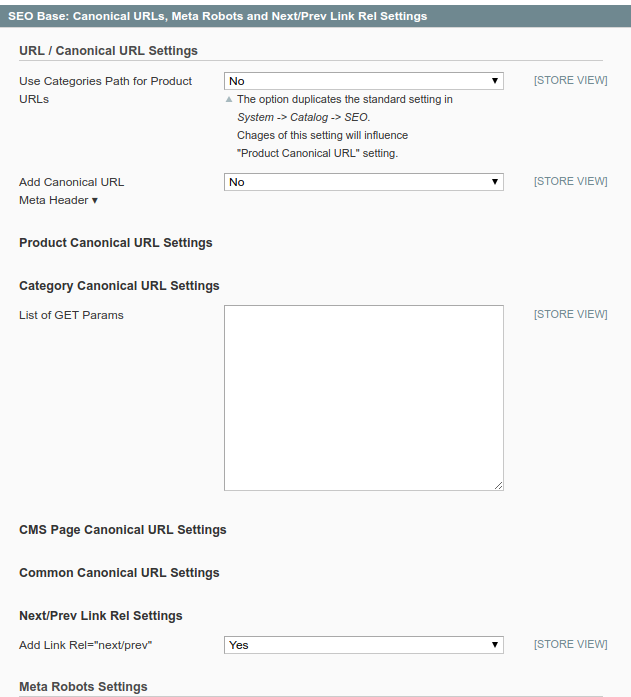
- Custom redirects that will ensure that your clients are automatically redirected to populated pages rather than greeted with a 404 error when trying to access a deleted item. Here's an example of how it should be implemented for your deleted product pages.
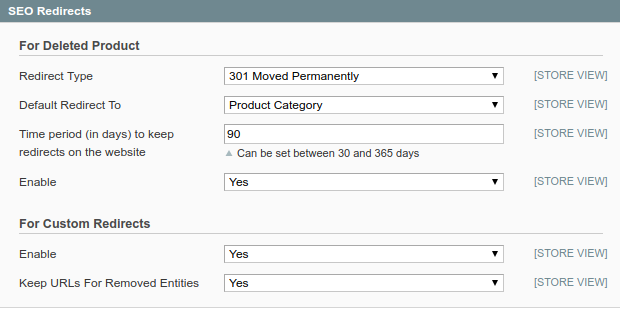
- Top tier tools that will assist in solving duplicate content issues throughout your site.
- Mechanisms to ensure SEO breadcrumbs are correctly set up and operating.
- Access to advanced SEO reports that are easy to understand and showcases the overall effectiveness of your current SEO campaign with up to date statistics.
Features are nice, but how do you get the most out of the Mageworx Magento SEO extension?
To answer this, we are going to focus on two of the essential features of the Magento SEO extension and our team has provided you with some great tips on how to get the most out of these two features, the extended SEO templates for metadata and titles and enhanced control over layered navigation pages.
Extended SEO Templates
One of the main features of the Mageworx Magento SEO extension is that it empowers users to automate their metadata and title entry to save time and money.
One of the main uses for this feature is to create templates that utilize every combination of synonyms to create automated grammatically correct titles and descriptions.
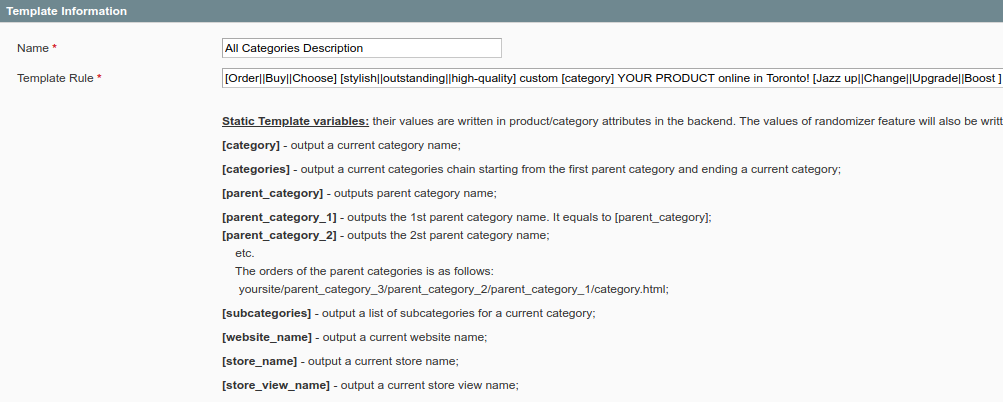
The extension provides an opportunity to apply a dynamic template (that consists of flexible synonym groups of words and phrases, dynamic variables and static words) to any combination of category, subcategory and product pages. Once applied, the templates create and fill pre-selected by you pages with SEO titles and meta descriptions that are unique, and SEO optimized.
However, you will need to proofread templates thoroughly, as each set of synonyms and static wording will have to link naturally, and grammatically.
The extension goes further than this, as you will be able to set up multiple templates to ensure all of your categories can be covered, no matter the product. Naturally, the template does need some work on the front end, but once populated and proof-read, the Magento SEO extension will allow you to adjust to changes such as price or availability automatically.
Most importantly, the SEO template tool will help avoid duplication of content across your site, which will allow your search engine ranking to grow naturally.
This sounds great, but how do you do it?
The Magento SEO extension is a powerfully and sophisticated tool, but there are some great tips and tricks to get the most out of it and the extended SEO templates.
1) There is no maximum to the number of synonyms you can add it is a best practice to include as many as possible, as it will only strengthen the overall effectiveness of your template. Make sure to divide each set of synonyms within a group with a double line ( || ) and every new group should be start and end with a bracket ( [ ] ).
2) Synonym groups will not mix, which will mean that your title and or description will start with one synonym from the first group. Balance your groups, and make sure if you are looking to utilize similar wording across the site to either include it within each group you set up.
3) Ensure that you do not input non-applicable words into a static box, they will show up across the site. For instance, if you are selling sports equipment, do not enter in baseball in the static table, as if you do, baseball will show up on the meta description even if it is for football gear. Make sure to be as generic as possible to allow the autonomous tool to do its work without mislabeling a potential page.
4) You can also include such dynamic elements as [category], [product_price] etc., which will be substituted by corresponding values after templates are applied.
Layered Navigation Pages
One of the more unique features of the Magento SEO extension is its ability to set a custom robots meta tag for any attribute combinations in the layered navigation of your site.
Thus, the extension allows a user to set a custom meta robots tag for any attribute combination that will work within layered navigation. This allows a client to control opening or closing a page to search engine robot's indexation, which in turn will affect the sites ranking.
Google rewards sites that are not only layered but have layered pages with unique metadata and titles.
The layered navigation page feature allows Magento SEO extension users to save a considerable amount of money and time by allowing layered navigation through attributes that enhance a sites searchability and use.
This all sounds great, but what are some tricks to get the most out of layering your navigation pages with the Magento extension?
1) The tool will show you where you can use indexing of your layered navigation URL's, and with a few clicks of a mouse, you can rank your site in more ways than you could have previously imagined.
2) Ensure you utilize the easy optimization options within the tool to ensure your layered pages have optimized and unique titles, meta descriptions, and keywords to provide Google easy indexation.
As an example, of what benefits can this Mageworx feature bring to you, consider this:
Think about a wine company, selling wine online, which has indexable categories for red, white and rose wine products only. Other product classifications, such as wine type, region, vinery, grapes etc., are layered navigation pages, closed from search engines' indexation.
Now imagine what incredible additional traffic opportunities will open to this company when all layered navigation pages are properly optimized using Extended SEO templates and available for Google's indexation! Awesome, right?
Final Thoughts
The Magento SEO extension by Mageworx is one of the most powerful tools on the market today. With only a few clicks of a button, you can enjoy a fully layered and indexed site, with autonomous metadata and titles to ensure your website snippets in Google are genuinely unique and CTR-optimized.
Mageworx extension is a great helping hand when it comes to optimizing important SEO elements of eCommerce websites. However, you should keep in mind that ongoing content production and link building are a must for your website to outperform its competitors and keep top positions for the most trafficable keywords!
Magento SEO Extension FAQs
How can a Magento SEO extension like Mageworx fit into a broader SEO strategy?
A Magento SEO extension works best as an automation layer on top of a clear strategy, not as a replacement for one. It helps you scale tasks such as generating titles and descriptions, but you still need a roadmap for which categories, brands, and search intents matter most. When those priorities are defined, you can configure templates and rules that consistently support them. The result is a catalog that aligns with your keyword and content plan instead of just being “filled in.”
What should a merchant check before enabling Mageworx on a live store?
Before switching anything on for customers, it is wise to test configuration on a staging environment that mirrors your catalog. There you can inspect sample titles, descriptions, and URLs across a mix of categories, products, and filters. It also helps to compare a snapshot of your current search snippets with the new ones the extension generates. Once you are confident that nothing important breaks, you can roll changes out in phases to reduce risk.
How can dynamic templates be used without losing brand voice?
Start by defining a small library of phrases and tone guidelines that reflect how your brand speaks, then build templates around those elements. You can use variables for product and category data, but keep the surrounding wording familiar so pages feel like they come from the same company. Testing a few example outputs with your content or merchandising team helps catch awkward combinations early. Over time, you can refine synonym sets and structures so automation stays aligned with your messaging.
How can content teams and developers collaborate when using Mageworx?
Developers usually handle installation and technical configuration, while content teams decide how fields should read in search results. A simple shared document that lists which templates apply to which sections of the site keeps everyone on the same page. Content editors can periodically review live snippets in search and adjust patterns when needed, while developers focus on performance and compatibility. This division of responsibility makes the extension feel like part of a joint workflow rather than a one time setup.
What special considerations apply when using the extension on multi store or multi language setups?
Each store view often needs its own wording, character limits, and priorities, even if the structure of templates is similar. You may decide that one region emphasizes brand names while another emphasizes attributes like size or material, so templates should reflect those preferences. It is also important to check that variables pull the correct localized values, especially for currencies and regional spellings. Regular spot checks across store views help ensure you are not accidentally mixing languages or formats.
How can a merchant evaluate the impact of Mageworx on organic performance after rollout?
One approach is to identify a group of categories or products where you apply the new logic and compare them with a similar group left unchanged. Monitoring changes in impressions, click through rates, and average positions over several weeks reveals whether snippets are more attractive in search. You can also track how often search queries align with the new wording patterns you introduced. Combining these metrics with revenue or lead data shows whether improvements in visibility translate into meaningful results.
How does an SEO extension complement other technical SEO tools and audits?
Crawling tools and search console data reveal where pages lack metadata, have inconsistent tags, or create confusing structures. The extension then becomes the system you use to fix those patterns at scale instead of editing fields one by one. When new issues appear in future audits, you can usually resolve them by adjusting template rules rather than running a large manual cleanup. This creates a loop where diagnostics and automation continually reinforce each other.
How can Mageworx help manage SEO during frequent price or inventory changes?
Because templates can reference dynamic values, changes to price or stock status can be reflected in search facing fields without rewriting everything. This is useful for merchants who update catalogs daily and do not want stale information lingering in snippets. You still need to avoid overloading titles with temporary details, but carefully chosen variables can keep descriptions accurate and timely. That balance keeps search results informative without creating constant content chaos.
What common mistakes do merchants make when first configuring a Magento SEO extension?
One frequent issue is trying to solve every SEO problem at once and creating overly complex patterns that are hard to maintain. Another is not reviewing outputs across enough examples, which leads to strange phrasing on niche products or deep categories. Some teams also forget to document which rules were applied, making it difficult to undo changes later. Starting with simple, well tested templates and expanding gradually tends to produce more stable results.
What SEO work still needs to be done manually even with a strong extension in place?
Tools can generate and standardize a lot of information, but they cannot decide which topics deserve full guides, buying content, or educational resources. Strategic decisions about which pages become true “leaders” in search still rely on human insight, as do outreach and digital PR efforts. Someone also needs to review analytics, align SEO with business goals, and refine the site structure as the catalog evolves. In other words, automation handles repetitive tasks while people continue to steer the overall direction.